
Restaurant systems
POS setup and configuration
Your till set up properly, with the menu, taxes, printers and staff logins done for you.
As low as $49- Delivery
- 2 to 6 days
- You get
- Finished, ready-to-use work
What you get
POS setup and configuration at BabaMake: from $49, with delivery in 2 to 6 days. Remote setup of the POS you chose, such as Square, Loyverse, Toast or a similar system, with your menu and options imported, tax rules, receipts, printers, staff roles and a short training call.
A new POS takes hours to set up right. Menu items, options, taxes and printer routing are where small mistakes cost money every day.
We set up the system you picked, from your menu and your rules, and test a few orders with you before you open. We work remotely, in your account, with a login you can remove afterwards.
Good fit for Restaurants, cafes, bars, bakeries and food trucks opening or switching to a new POS.
Choose a package
The price shown is the full price. Add-ons are optional and never pre-selected.
One price. A real person checks it. No tokens, no prompting.
Starter
Menu and receipt basics
$49
- Delivery
- 2 business days
- Revision rounds
- 1
What's included
- Up to 50 items imported with categories and prices
- 1 tax rule and payment types, such as cash and card
- Receipt header and footer with your details
- 1 printer or 1 device checked with a test order
Recommended
Standard
Options, printers and staff roles
$89
- Delivery
- 4 business days
- Revision rounds
- 2
What's included
- Everything in Starter
- Up to 150 items with options, such as size, milk or extras
- Up to 3 tax rules, discounts and service charge
- Kitchen and bar printer routing, up to 3 printers
- Staff accounts with roles and PINs
- 30 minute training call for you or a manager
Pro
Full setup with stock and reports
$179
- Delivery
- 6 business days
- Revision rounds
- 3
What's included
- Everything in Standard
- Up to 400 items, combos and time based menus
- Basic stock tracking turned on for key items
- Kitchen screen setup, if your POS has one
- Daily sales report sent by email
- 2 training calls and a written cheat sheet for staff
Before you order
Common doubts, answered plainly.
I'm not technical. Is that a problem?
Not at all. You tell us what you want in your own words. We handle the technical side and only ask you about things that need your decision.
I don't know where to start.
Describe your goal in the quote builder or ask Baba, and you get a matching package with its price. We confirm the scope with you before anything is charged.
It's more than I want to spend right now.
Start with the Starter package and upgrade when you're ready. Sending an order is free, and nothing is charged until you approve the scope we confirm.
What if I don't like it?
Every package includes revision rounds. Anything that doesn't match the package is fixed for free, and if we can't fix it, you can get a full refund of that order.
Are there monthly fees?
Only if you choose a monthly plan. Every price says whether it's one-time or per month, and any hosting or domain fees paid to other companies are listed under "Not included".
Can I change it later?
Yes. Feature upgrades and care plans cover changes after delivery, and you always see the price before any work starts.
I already have a website.
That's fine. We can redesign it, fix it or add to it. Tell us what you have and what's not working.
What is included
- Your POS set up and tested with real test orders
- The menu import file
- A list of every setting we changed
- Training call recording, if you want one
Not included
- POS hardware such as tablets, printers, cash drawers and card readers
- The POS subscription and card processing fees, which you pay to the POS company
- Visiting your site. Setup is remote
- Accounting or tax advice. You confirm the tax rates with your accountant
Delivery and revisions
- File formats
- Changes made in your POS account, Menu as a spreadsheet you can reuse, Staff cheat sheet as PDF (Pro)
- How you receive it
- By email and in your BabaMake account, where you can download it any time.
- Revisions
- 1 to 3 rounds depending on package. How revisions work
- Fixes after delivery
- Free fixes for 30 days after you approve, for anything that does not match your package.
- Paid to providers, not to us
- Platform subscription (Square, Loyverse, Toast)
- Hardware, such as tablets, printers and card readers
- Card processing fees
You pay these directly, in your own name. We never add a markup.
Please read before you order
BabaMake is not affiliated with Square, Loyverse, Toast or any POS company. We set up the account you own.
We use a staff login you create for us and you can remove it when we finish. We never ask for your bank details.
Not sure which POS to pick? Ask before you order and we will tell you what fits a place your size.
Try one first
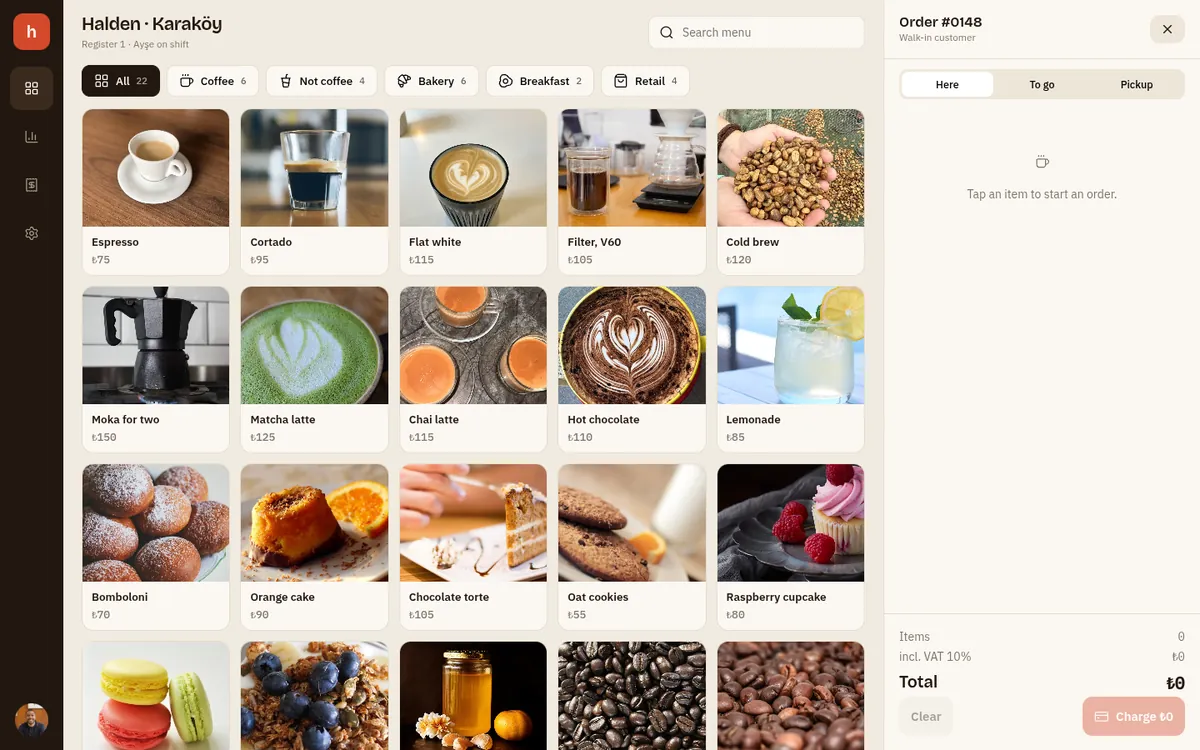
A fast till for a café: modifiers, split card or cash, receipts and the day's totals.
Typical projects
A new cafe
60 drinks and pastries with milk and size options, cash and card, and one receipt printer.
A restaurant switching systems
The old menu exported to a sheet, cleaned and imported, with kitchen and bar printers split.
A food truck
A short menu, one tablet and a card reader set up the day before the first market.
Complete your setup
Optional extras that usually come next. Nothing is added unless you choose it.
Save more with a bundle
- Cafe counter kitYour POS set up with options, printers and staff roles, QR ordering and pay at table, and a digital stamp card for regulars.
As low as
Was $387$339 Save 12% vs separately - Full restaurant systemPOS setup, an ordering site, QR table ordering, a kitchen screen with stations, inventory with recipe costing, online bookings and a sales dashboard with a weekly email. Hardware and outside fees are separate.
As low as
Was $1,583$1,400 Save 11% vs separately
Questions about POS setup and configuration
What is the price of POS setup and configuration at BabaMake?
Starter: $49, Standard: $89, Pro: $179. One-time prices in US dollars, and you see the full total before you pay.
How much does POS setup cost?
At BabaMake basic POS setup starts at $49, setup with options, printers and staff roles is $89, and a full setup with stock and reports is $179. The POS subscription and hardware are paid separately.
Which POS systems do you set up?
Common ones for restaurants and cafes, such as Square, Loyverse and Toast, and others with a web admin. Tell us which one when you order.
Can you come to my restaurant?
No. We do setup remotely and test it with you on a call. Plugging in hardware stays with you.
How long is delivery for POS setup and configuration?
Starter: 2 business days, Standard: 4 business days, Pro: 6 business days. Delivery is counted in business days from when your order is confirmed and paid.
What do I get with POS setup and configuration?
Your POS set up and tested with real test orders, The menu import file, A list of every setting we changed, Training call recording, if you want one.
Do I own what you deliver?
Yes. When you pay for a milestone, you own the custom work made for you in it. Third-party fonts, images and software stay under their own licenses, which we list in your handoff.
How do revisions work?
Each package includes a set number of revision rounds. A round is one list of changes to the work we delivered. New features or a change of direction count as a new request, which we quote first. Need more rounds? Add 2 extra rounds for $19 to $79, depending on the service.
When do I pay?
Nothing is charged when you place an order. We confirm the scope, then send a secure payment link. Work starts once it is paid. Bigger projects are split into milestones you approve and pay one at a time.
Ready when you are.
Pick a package above, or tell us what you are trying to do and we will suggest the smallest version worth building.